 Skip to content
🔹 Meta Description: Learn how to install an SSL certificate on GoDaddy in 6 easy steps. Improve website security, SEO rankings, and user trust with this beginner-friendly SSL setup guide.
🔹 Securing your website with an SSL certificate is one of the most important steps for improving website security, SEO rankings, and customer trust in 2025. If your website still shows “Not Secure” in the browser, visitors may leave your site immediately, which can hurt your traffic and conversions.
🔹 This complete guide explains how to install an SSL certificate on GoDaddy step-by-step. Whether you are a beginner or an experienced website owner, this tutorial will help you purchase, activate, install, and verify your SSL certificate easily.
What Is an SSL Certificate?
🔹 An SSL (Secure Sockets Layer) certificate encrypts data exchanged between your website and its visitors. It protects sensitive information such as:
- Login details
- Credit card information
- Personal data
- Contact form submissions
🔹 Once SSL is installed, your website URL changes from:
Why SSL Certificates Are Important for Website Security
1. Protects User Data
SSL encrypts all communication between your website and visitors, preventing hackers from stealing information.
2. Improves SEO Rankings
Google officially uses HTTPS as a ranking factor. Websites with SSL certificates often rank higher in search results.
3. Builds Customer Trust
Visitors trust websites with the secure padlock icon because it shows the site is safe and legitimate.
4. Required for Online Payments
If you run an eCommerce store, SSL is mandatory for secure payment processing.
5. Helps Meet Privacy Regulations
SSL supports compliance with GDPR and other data protection laws.
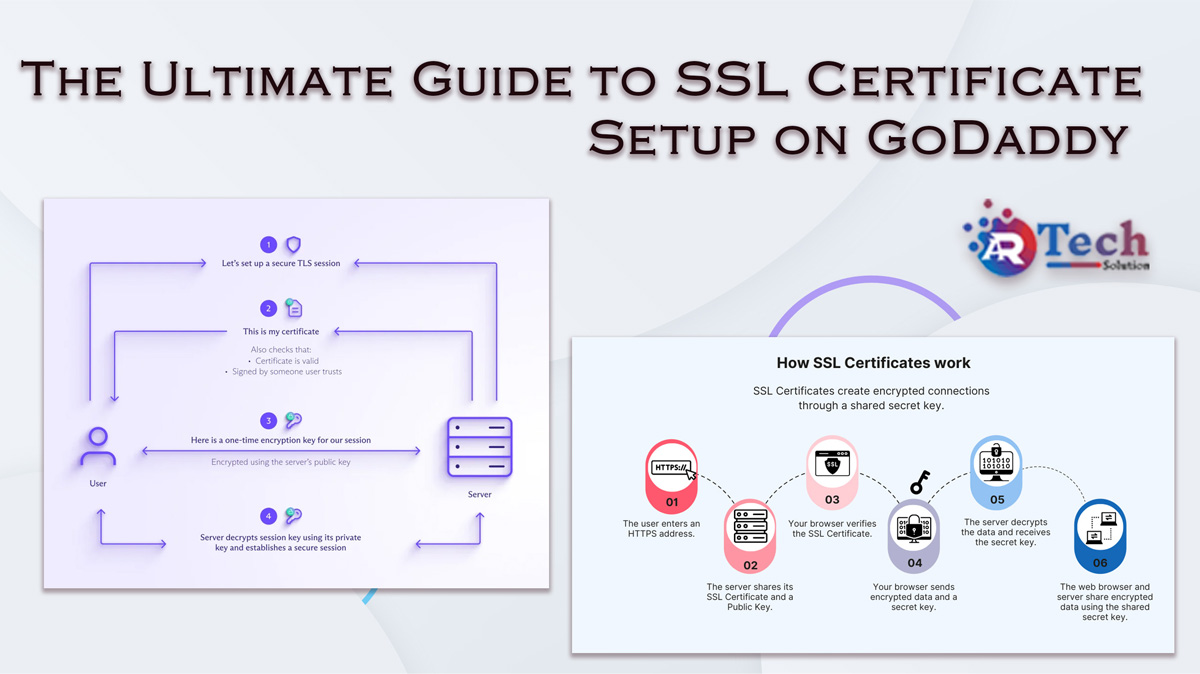
🔹 How SSL Certificates Work
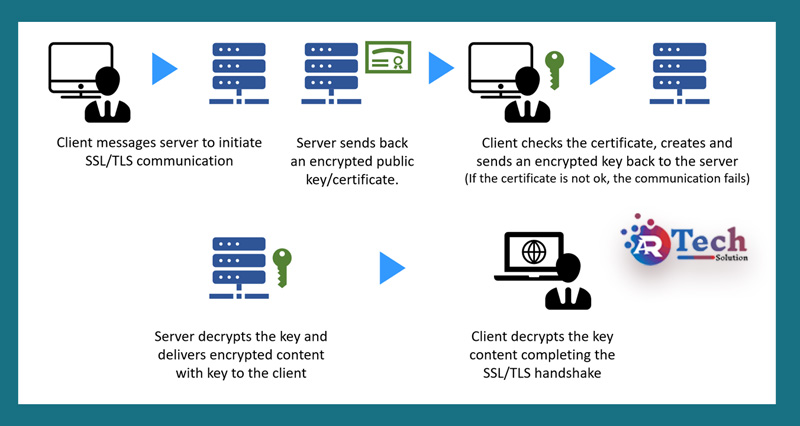
SSL certificates establish a secure encrypted connection between a browser and a web server.
🔹 SSL Handshake Process
- The browser requests a secure connection.
- The server sends the SSL certificate.
- The browser verifies the certificate.
- Encryption keys are exchanged securely.
- A secure HTTPS connection is established.
This process keeps data safe from hackers and cyber threats.
🔹 GoDaddy SSL Certificate Options
GoDaddy offers several SSL certificate plans based on your website requirements.
🔹 Popular GoDaddy SSL Types
🔹 Standard SSL
Protects one domain name.
🔹 Wildcard SSL
Secures unlimited subdomains under one domain.
🔹 UCC Multi-Domain SSL
Protects multiple websites using one certificate.
🔹 EV SSL
Provides the highest level of trust and validation.
Official SSL page:
GoDaddy SSL Certificates
How to Install an SSL Certificate on GoDaddy in 6 Easy Steps
🔹 Step 1: Purchase an SSL Certificate
Log into your GoDaddy account and choose the SSL certificate that best fits your website.
Before Purchasing
Use DV SSL for blogs
Use OV SSL for businesses
Use EV SSL for eCommerce stores
Use Wildcard SSL for subdomains
🔹 Step 2: Generate a CSR (Certificate Signing Request)
A CSR is required to activate your SSL certificate.
Information Required
- Domain name
- Company name
- City and country
- Email address
You can generate a CSR using cPanel or your hosting dashboard.
🔹 Step 3: Activate Your SSL Certificate
After purchase:
- Open GoDaddy Dashboard
- Go to “My Products”
- Find SSL Certificates
- Click “Activate”
Upload your CSR during the activation process.
Step 4: Verify Domain Ownership
GoDaddy verifies your domain ownership using:
- Email verification
- DNS verification
- HTML file verification
After verification, your SSL certificate will be issued.
Step 5: Install SSL Certificate on GoDaddy Hosting
For cPanel Hosting
- Log into cPanel
- Open “SSL/TLS”
- Upload:
- Certificate file
- Private key
- CA bundle
- Click “Install Certificate”
For Managed WordPress Hosting
GoDaddy may automatically install the SSL certificate.
Step 6: Force HTTPS on Your Website
After SSL installation:
- Redirect HTTP to HTTPS
- Update website URLs
- Fix mixed content errors
- Update WordPress settings
WordPress HTTPS Settings
🔹 Common SSL Certificate Problems and Fixes
1. Mixed Content Warning
This happens when some files still load over HTTP.
Fix
Update all image, CSS, and JavaScript links to HTTPS.
2. SSL Certificate Not Trusted
Usually caused by missing CA bundle files.
Fix
Reinstall the SSL certificate correctly.
3. Certificate Mismatch Error
Occurs when the SSL certificate does not match the domain.
Fix
Ensure the certificate matches the correct domain name.
4. Redirect Loops
Incorrect redirect settings can create HTTPS loops.
Fix
Review .htaccess redirect rules carefully.
🔹 How to Verify SSL Installation
After installation, test your SSL certificate properly.
🔹 Methods to Check SSL
Check Browser Padlock
Look for the secure lock icon near your URL.
Use SSL Testing Tools
Popular SSL checker tools include:
- SSL Labs
- Why No Padlock
- GoDaddy SSL Checker
🔹 SEO Benefits of SSL Certificates
SSL certificates directly improve website SEO performance.
SEO Advantages
- Better Google rankings
- Increased trust signals
- Improved user experience
- Lower bounce rate
- Higher conversions
Google prioritizes secure HTTPS websites over HTTP websites.
🔹 Best Practices for SSL Certificate Management
Enable Auto-Renewal
Prevent SSL expiration and website downtime.
Use Strong TLS Versions
Always use updated security protocols.
Monitor SSL Health
Regularly test SSL security and performance.
Redirect All HTTP Pages
Ensure every page loads securely over HTTPS.
🔹 Frequently Asked Questions (FAQs)
1. Does GoDaddy provide free SSL certificates?
Yes, some GoDaddy hosting plans include free SSL certificates.
2. How long does SSL activation take?
DV SSL activates within minutes, while EV SSL may take a few days.
3. Why is my website still showing “Not Secure”?
This usually happens because of mixed content issues or incorrect redirects.
4. Can I install SSL without cPanel?
Yes, SSL can also be installed using Plesk, DirectAdmin, or server access.
5. Is SSL important for SEO?
Yes, HTTPS is an official Google ranking factor.
6. How often should SSL certificates be renewed?
Most SSL certificates renew annually unless auto-renewal is enabled.
